 21sys
21sysLocking my Macbook's keyboard for cleaning on Asahi Fedora Linux
This is the first blog post on my journey trying to make Asahi Linux (or to be precise Fedora 42 Asahi Remix) on a Macbook Air M2 my main system for daily use.
The problem
Something that you notice soon with current Apple Silicon Macbooks is that it’s not straight-forward to physically clean the keyboard. Even when the system is powered off, by default any key press will start the system.
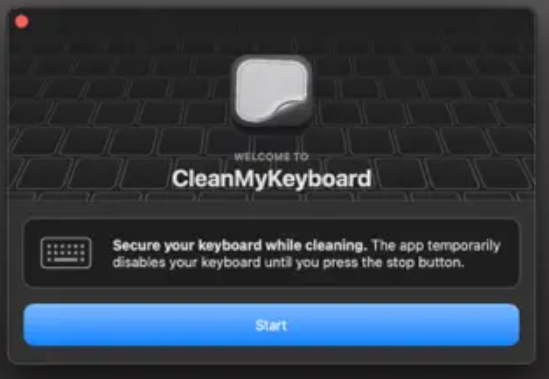
On MacOS, keyboard cleaning apps like CleanMyKeyboard became quickly popular. They show a GUI with a button that toggles locking and unlocking the keyboard.
So, how can we lock the keyboard on Linux?
I wanted something similar on the Asahi Linux side.
So, how can we lock the keyboard on Linux?
First, let’s find the keyboard device:
$ cat /proc/bus/input/devices | grep -E -A3 'keyboard|AT Translated'
N: Name="Apple MTP keyboard"
P: Phys=24eb30000.input.2 (keyboard)
S: Sysfs=/devices/platform/soc/24eb14000.fifo/24eb30000.input/0019:05AC:0351.0003/input/input1
U: Uniq=FM74397A8W50V7CAF+HKG
H: Handlers=sysrq kbd leds event1
In the sysfs path, there’s a virtual file [device]/inhibited that lets you toggle between locking and unlocking the device by writing 1 or 0 to it.
So, for example, this would lock the keyboard:
sudo echo 1 > /sys/devices/platform/soc/24eb14000.fifo/24eb30000.input/0019:05AC:0351.0003/input/input1/inhibited
And this would unlock it:
echo 0 > /sys/devices/platform/soc/24eb14000.fifo/24eb30000.input/0019:05AC:0351.0003/input/input1/inhibited
Now we could put this i.e. in a shell script that locks the keyboard for 45 seconds:
#!/bin/bash
KEYB=/sys/devices/platform/soc/24eb14000.fifo/24eb30000.input/0019:05AC:0351.0003/input/input1

echo 1 > $KEYB/inhibited
sleep 45
echo 0 > $KEYB/inhibited
The solution: Let’s put it in a small GUI app
That’s some nice progress, but wouldn’t it be nice to have a GUI app instead of a timer?
So let’s put this into a Python script. As some Python3 is almost always preinstalled on any Linux distro and Python ships with the Tk GUI framework in its standard library, we can create a single-file, dependency-free script.
The full script is here on GitHub.
And here’s what it looks like:
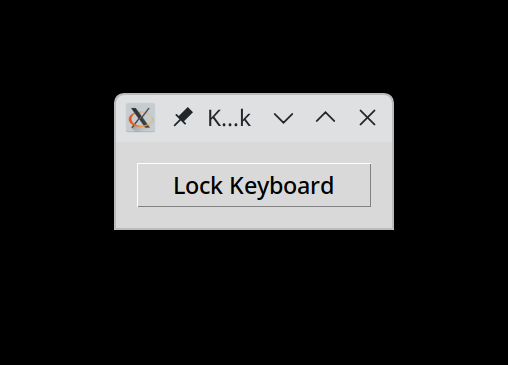
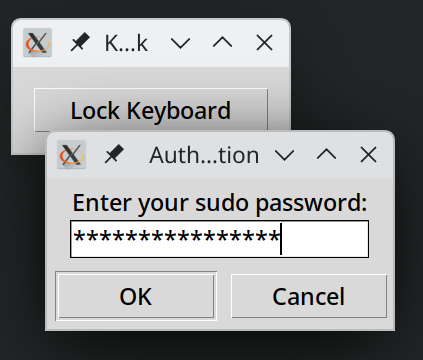
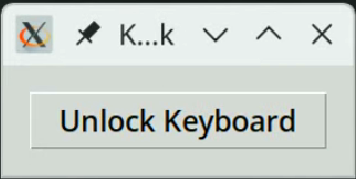
The Python script hardcodes the keyboard device at the beginning of the file. If you want to use it, make sure to find out what your keyboard device is and replace this string.
# **YOUR** inhibit-path:
# find out i.e. with: cat /proc/bus/input/devices | grep -E -A3 'keyboard|AT Translated', copy sysfs path and append /inhibited
# (this path is for my Macbook Air M2 on Asahi Fedora 42)
DEVICE = '/sys/devices/platform/soc/24eb14000.fifo/24eb30000.input/0019:05AC:0351.0003/input/input1/inhibited'
Other than that, installation is straight-forward:
Place the script (cleanmykeyboard) somewhere in your PATH, i.e. in /usr/local/bin.
And if you want the CleanMyKeyboard app to also appear in the start menu, here’s a .desktop file for it. To be copied i.e. to ~/.local/share/applications/.